📱 Best APK for Shake Flashlight – Fast Torch: Instant Light with Just a Shake
In today’s world, our smartphones have replaced many single-purpose gadgets that we once carried separately. One of those essentials is the trusty flashlight. Whether navigating a dark room, finding keys under a couch, or simply needing quick light in emergencies, a flashlight app on your Android device can be incredibly useful. But what if your flashlight could turn ON instantly — not by tapping a button, but with a simple shake of your phone? This is where the Shake Flashlight APK — also known as Fast Torch — becomes a standout tool.
In this article, we’ll explore everything you need to know about Shake Flashlight apps, the benefits of shake-to-activate features, how to choose the best app, safety and battery considerations, advanced features, and why users love this convenience-packed tool.
🔦 What Is a Shake Flashlight App?
A Shake Flashlight App is an Android application that turns your phone’s flashlight (LED light) ON or OFF using motion gestures — most commonly by shaking your phone. Instead of going through menus or unlocking your device and touching the screen, a quick shake is all it takes to light up your surroundings.
This type of app typically works by monitoring the accelerometer sensor in your smartphone. When it detects a shaking motion above a certain level, it triggers the flashlight.
Such apps are also called:
Shake Torch
Fast Torch
Shake Light
Instant Flashlight
They make everyday life easier by simplifying one common action — getting instant light — into a natural, intuitive gesture.
⭐ Why Choose a Shake Flashlight App?
The traditional flashlight function on many phones requires a few taps on the screen:
- Unlock phone
- Open app drawer or control center
- Tap flashlight icon
That’s fine in most cases, but in urgent or dark situations you may want light instantly — without fumbling through your phone.
Here are the key reasons thousands of users prefer shake-activated flashlight apps:
✅ 1. Instant Light
With the right app, a swift shake turns on your phone’s torchlight instantly — no buttons, no menus.
✅ 2. Safe and Convenient
When you’re holding something in one hand or moving in the dark, activating light with a shake is safer.
✅ 3. Customizable Sensitivity
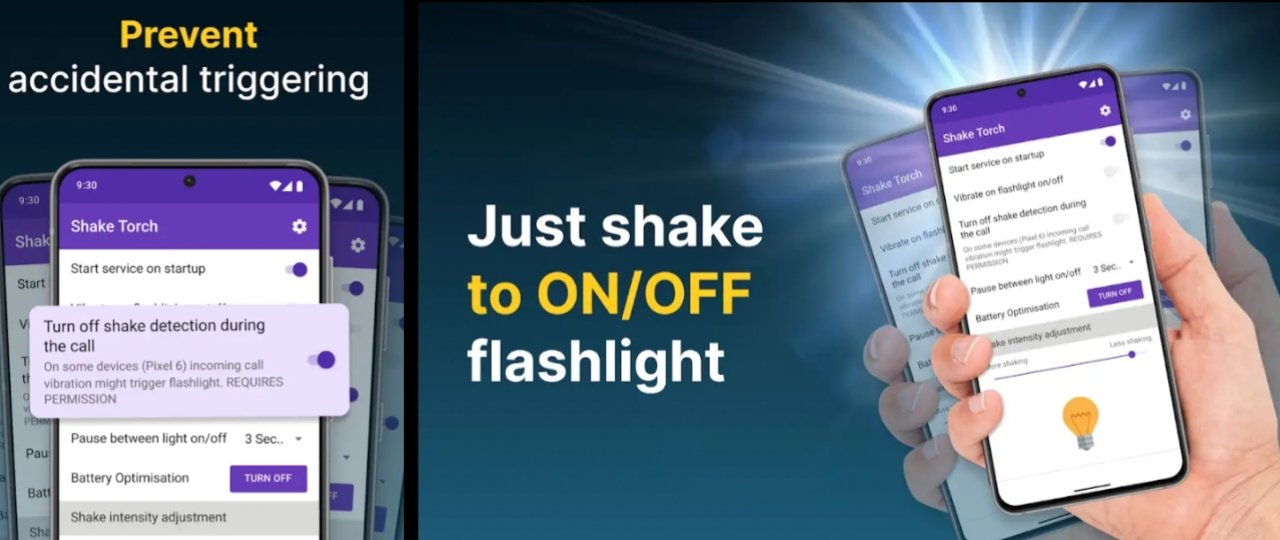
Many shake flashlight apps let you adjust how hard you have to shake to trigger the light — this avoids accidental activations.
✅ 4. Low Memory, Fast Response
Good flashlight APKs are lightweight and respond quickly — even on older devices.
✅ 5. Fun and Intuitive
A gesture-based interface feels modern and natural — it’s like waving a magic wand for light.
🏆 Top Features to Look For
When choosing the best Shake Flashlight APK or Fast Torch app, these are the features you should look for:
🔹 1. Quick Response
Your flashlight should turn on within a fraction of a second from the moment you shake.
🔹 2. Adjustable Sensitivity
Not all vibrations are intentional! A good app lets you choose low, medium, or high sensitivity so that gentle movements don’t accidentally turn on the torch.
🔹 3. Minimal Battery Drain
Apps that constantly monitor sensors can use battery. The best APKs balance instant response with good battery efficiency.
🔹 4. Clean Interface
Even though the main activation is via motion, the app should still have a clean interface for settings and manual control.
🔹 5. Small Size & Low Resource Usage
A lightweight APK won’t slow down your device or occupy too much storage.
🔹 6. No Ads or Minimal Ads
Ads can be intrusive — especially on utilities you open often. The best apps keep ads to a minimum or offer ad-free versions.
🔹 7. Optional Strobe Mode
Some apps include fun or useful extras like strobe/flashing lights for signaling.
📥 How Shake Flashlight Works (Behind the Scenes)
Most smartphones include a sensor called an accelerometer — this measures movement and orientation. Shake flashlight apps use this sensor to detect motion.
Here’s a simplified explanation:
- Sensor Listener Active: When the app is running, it listens for accelerometer signals.
- Shake Threshold: The app constantly checks motion speed and intensity.
- Trigger Event: When the movement crosses a set threshold, the app activates the flashlight.
- Toggle Light: Another shake turns the light off.
Some apps also use the gyroscope sensor for more accurate motion detection.
📱 Step-by-Step: How to Use a Shake Flashlight App
While different apps have different interfaces, the usual steps are:
- Install the APK or App from Play Store
Make sure to download from a trusted source.
Allow necessary permissions (Camera access for flashlight).
- Open the App
Set the shake sensitivity.
Choose whether you want light ON with one shake or a pattern of shakes.
- Enable Shake Feature
Turn on the shake activation inside the settings.
- Shake to Light
Grab your phone and give it a shake.
Your flashlight should instantly turn on!
- Shake Again to Turn Off
You can often use the same gesture to switch off the light.
⚡ Tips to Avoid False Activations
One common concern with shake-activated apps is accidental triggers. Here’s how you can minimize that:
✔️ Set a higher sensitivity threshold (so the app requires a stronger movement)
✔️ Activate the app only when needed
✔️ Use patterns (for example, 2 shakes in quick succession)
✔️ Turn off the shake feature when the phone is in your pocket or bag
📲 Safety and Permissions
Flashlight apps usually need Camera permission because the LED light is part of the camera hardware.
✔ Be cautious about unnecessary permissions — a flashlight app should not need access to:
Contacts
Messages
Location
Microphone
If an app asks for too many permissions, it could be unsafe.
💡 Battery Considerations
Since shake flashlight apps often run in the background to detect motion, users may worry about battery drain.
Here’s how quality apps minimize power usage:
🔹 Only run sensor monitoring while the app is active
🔹 Pause background monitoring when the screen is off
🔹 Use optimized code to reduce CPU usage
Some apps even offer a “sleep mode” to stop sensor detection when not needed.
🌐 Where to Get the Best APK for Shake Flashlight
You can install Shake Flashlight apps from:
✔ Google Play Store — safest source
✔ Trusted APK platforms — make sure it’s from a verified developer
✔ Official developer site — if available
Always check user reviews, ratings, and permissions before installing any APK.
📊 Comparing Popular Shake Flashlight Apps
Feature Shake Flashlight Fast Torch Shake & Flash
Shake-to-Activate ✔️ ✔️ ✔️
Adjustable Sensitivity ✔️ ✔️ ❌
Strobe Mode ❌ ✔️ ✔️
Low Battery Usage ✔️ ✔️ ❌
Minimal Ads ✔️ Paid Option ❌
Note: The names above are examples — always verify specific app features before installation.
🎛️ Best Settings for Everyday Use
Here are recommended settings if you install a shake flashlight app:
🔸 Sensitivity: Medium (balance between responsiveness and accidental activation)
🔸 Shake Pattern: Single shake for on, single shake for off
🔸 Background Detection: OFF (unless you really need it)
🔸 Strobe: OFF (save battery unless needed)
These settings give you quick light with minimal battery use and fewer accidental triggers.
🧠 Real-World Uses for Shake Flashlight
Here are some everyday scenarios where shake flashlight apps shine:
🕯️ Power outages – instant light without searching for buttons
🍽️ Finding dropped items in dim areas
🚶 Walking at night with one hand full
🔑 Searching locks or keys at night
🚗 Emergencies on the road
🏕️ Camping or outdoor activities
Because all you need is a shake, these apps make light more intuitive and more immediate.
🤔 Drawbacks to Consider
While shake flashlights are very useful, they do have limitations:
⚠️ Accidental triggers if sensitivity is too low
⚠️ Minor battery usage due to sensor monitoring
⚠️ Not all phones support reliable motion detection
⚠️ Some APKs may contain ads or require in-app purchases
Still, a well-designed app manages these issues effectively.
DOWNLOAD
- 📌 Final Thoughts
A Shake Flashlight APK — Fast Torch app is one of the most practical everyday tools you can add to your Android device. Whether you’re caught in the dark unexpectedly, need quick illumination without navigation menus, or simply enjoy the convenience, shake-activated flashlight apps deliver fast, reliable light with a simple gesture.
When choosing an app: ✔ Pick one with adjustable sensitivity
✔ Avoid apps with unnecessary permissions
✔ Prefer those that are lightweight and low on ads
✔ Make sure it comes from a trusted source
With the right APK installed, you can literally shake your phone and light up the world — instant and effortless.